As businesses grow, accounting processes take up more and more time and resources. To get rid of this routine, entrepreneurs turn to special automation tools. The most popular software solutions for optimizing business processes are ERP and CRM systems. Although their functions differ, both are aimed at improving the quality of customer service, structuring large volumes of data, and automating key processes.
If you are looking to automate your business but are unsure which system is best for your needs, this article will help you. We will take a closer look at the differences between ERP and CRM, compare their key features, and explain the role they can play in your business.
What is a CRM system?
CRM (Customer Relationship Management) is a software for managing relationships with customers. It allows you to store and manage all customer data, including interaction history, deals, contact information, and marketing campaigns. CRM helps build trusting relationships with customers by tracking the entire customer journey and providing tools for personalizing interactions.
CRM functionalities
CRM allows you to improve communication methods, increase sales, automate routine processes, and optimize a host of other aspects of your business. Some of the key features that enable this include:
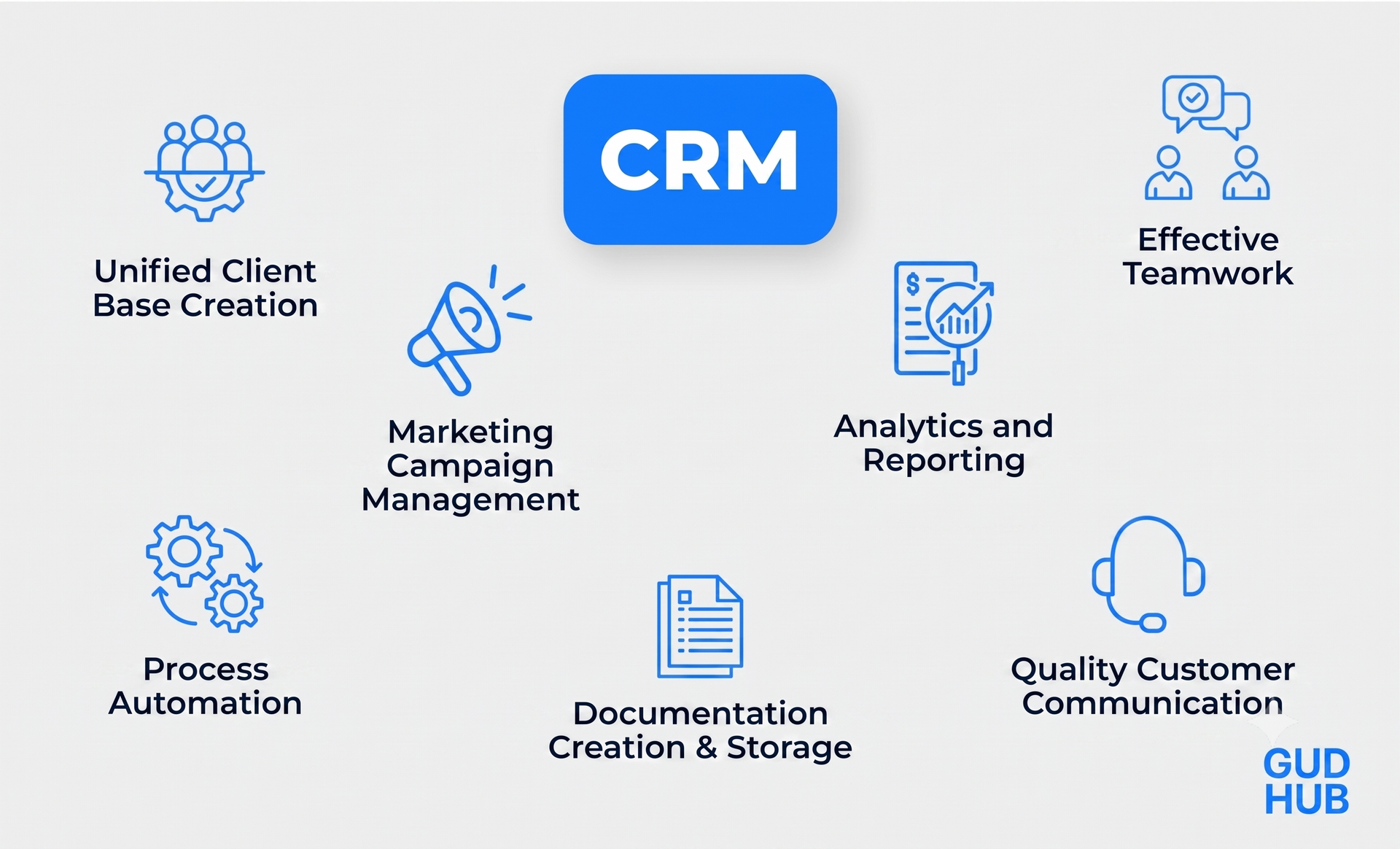
Creating a single customer base
The system stores all customer data, including contacts, orders, requests, applications, invoices, interaction history, etc. This provides convenient access to the necessary information for all employees. CRM itself sorts all data, organizes it by categories, and automatically generates detailed reports on key indicators.
Marketing campaign management
CRM helps you create advertising campaigns that match the stage of the sales funnel that the customer is in. With access to customer data, you can create personalized emails with offers based on previous orders or preferences. In addition, integration with email services allows you to create and send emails directly from the CRM system.
Process automation
This software automates sales processes, lead management, and analytics, allowing you to focus on more important aspects of your business. For example, a CRM for an online store can automatically process orders, reserve inventory, and create a shipping invoice with the appropriate postal service. You can also customize your own automation to meet your business needs.
Generating analytics and reports
CRM can automatically generate reports to analyze the effectiveness of business processes. For example, you can get analytics on sales, marketing campaigns, customer behavior, and employee performance indicators. This allows you to make strategically sound decisions based on accurate analytical data.
Creating and saving documentation
You can add ready-made templates in the system, according to which CRM will automatically generate documents. When a new deal appears, the program automatically generates a contract and adds signatures of responsible employees. After the deal is completed, all documentation is stored in a separate database along with applications, invoices and contracts.
Ensuring effective teamwork
In CRM, you can create tasks, assign them to employees, set deadlines, prioritize, and monitor project progress. You can also track key performance indicators for each employee and generate reports on the success of completed tasks.
High-quality communication with customers
CRM improves the quality of interaction and helps build trusting relationships with the audience. This is possible by creating a personalized experience, automatic reminders and various useful integrations. Analytical tools help evaluate the quality of service, identify weaknesses and improve them in a timely manner.
What is an ERP system?
ERP (Enterprise Resource Planning) is software for effective management of company resources. An ERP system allows you to manage accounting operations, inventory, logistics, production, supply, procurement and project execution. It helps automate routine processes, however, unlike CRM, ERP is aimed exclusively at managing the company's internal processes, and not at interacting with customers.
ERP Functionalities
ERP is designed for comprehensive resource management of medium and large businesses. It provides access to a single database that allows you to control all key business processes - from purchasing goods to payroll. Let's take a closer look at the main functions of ERP:
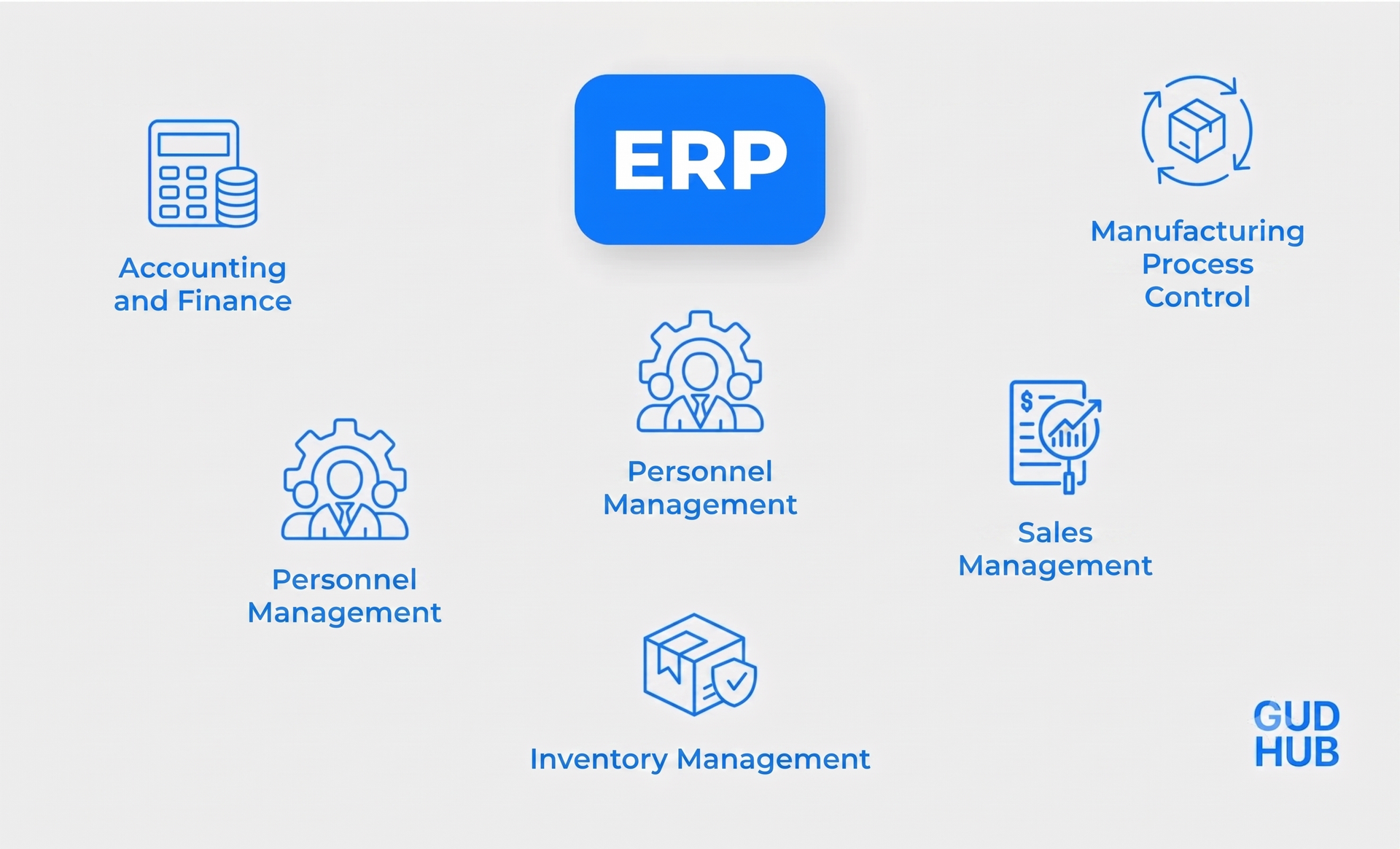
Accounting
ERP forms a centralized database where all accounting information is stored: transactions, debts, loans, vacation pay, salaries, etc. The program is able to automatically conduct financial transactions, sort data, and create financial reports. This allows you to effectively manage accounting and track the financial condition of the company.
Generating reports and analytics
Based on the collected data, the system generates detailed analytics on the efficiency of business processes. ERP helps to make informed management decisions using accurate statistical indicators. It also supports the resource planning function, which allows you to optimize costs and make timely purchases.
Warehouse accounting
The system allows you to effectively keep inventory records: track product balances, control delivery times, and make purchases. ERP automates warehouse management, generates reports with forecasts, analyzes sales, and sends advance notifications about shortages of certain products.
Personnel management
The system provides effective team management: task performance control, work schedule creation, vacation and salary accrual. Well-established internal communication in a single interface allows employees of different departments to quickly exchange information, which makes the team work more efficiently.
Sales management
ERP manages all stages of sales, from order acceptance to delivery. It automatically reserves goods in the warehouse, issues invoices, creates invoices, tracks logistics, and generates reports on sales performance.
Production process control
Thanks to forecasting functions, you can create a high-quality production plan that ensures timely delivery of goods. ERP automatically controls all production processes, generates reports on their success and quality.
Common characteristics of ERP CRM systems
These software solutions are designed to optimize business operations by managing and automating its processes. ERP and CRM form a single database with important data for the company, automatically group them and create detailed reports. This provides quick access to the necessary information and the ability to perform qualitative analysis.
CRM and ERP systems allow you to keep inventory and accounting records, track team performance, control sales, generate reports, manage projects, and control other business processes. Both solutions simplify the work of entrepreneurs through automation, allowing them to focus on more important tasks. However, despite their common features, these systems have different purposes, so the choice depends on the needs of your company.
What is the difference between CRM and ERP?
Despite their common characteristics, the role of ERP and CRM in business is different:
An ERP system is designed to optimize a company's internal processes, including accounting, inventory management, team management, and sales. All information is grouped and stored in a single database, making it easier to control and manage key aspects of the business.
CRM is focused on building trusting relationships with customers. It optimizes the creation of advertising strategies, tracking customer data, generating leads, managing the sales funnel, controlling projects and generating reports. CRM helps increase sales and build long-term relationships with customers who will return to you again and again.
Simply put, ERP manages resources and optimizes processes within a company, while CRM manages customer data to increase sales. It is not correct to compare these systems, as they have different purposes and work best in combination.
Some ERP systems may include some CRM functionality, such as sales tracking, marketing automation, and project management. However, CRM is a highly specialized software, mostly focused on improving customer relationships.
For example, GudHub CRM is not a resource management program, but its wide functionality allows you to configure resource planning, analyze employee performance, and maintain accounting and warehouse records.
ERP vs. CRM: Which System is Right for You?
The choice of system depends on the needs and capabilities of your business. The main criteria for choosing between ERP and CRM systems are:
- Functionality: If your business works with a large number of customers and needs to establish communication, manage contacts, and create marketing campaigns, CRM will come in handy. On the other hand, ERP is more suitable for companies with a large number of production, accounting, and logistics processes that require centralized management and optimization.
- Complexity of enterprise processes. A CRM system helps in managing and automating businesses that sell goods or provide services. However, if your company has many departments, each of which needs to be controlled and ensure the efficiency of their work, you should choose an ERP system.
- Implementation cost. An ERP system requires significantly higher costs because it manages large amounts of data, has broader functionality, and requires more time for staff training. CRM systems, on the other hand, are usually more affordable and easier to implement. In addition, there are free customer data management systems that are suitable for small businesses with a small number of users.
To ensure the stable operation of the business, entrepreneurs often use ERP CRM as a comprehensive solution, as they can complement each other. However, their integration usually requires the help of a programmer who will combine both software solutions in the program code.
Areas of application of CRM and ERP software
CRM can be used by companies of all sizes if they are looking to improve customer service, increase sales, improve marketing campaigns, and expand their lead base. Here are some examples of areas where CRM is particularly useful for businesses:
- The scope of services is client base management, record keeping, and tracking the status of transactions.
- B2B companies — preserving interaction history, automating transactions, and maintaining long-term collaborations.
- Online stores — managing marketing campaigns, building a lead base, and concluding long-term agreements.
- Hotel and restaurant business — automatic booking, record management, use of loyalty programs.
- Educational institutions - established interaction with students, storage of personal data, formation of class schedules.
ERPs are indispensable assistants for large businesses that need to control several processes at the same time. They help optimize the management of logistical, financial, human, product and other resources. Examples of businesses that are suitable for ERP systems:
- Production - resource allocation, inventory control, product sales.
- Construction companies — procurement, cost planning, project implementation control.
- Medical institutions — control of financial transactions, record keeping, warehouse management.
- Financial companies — automation of accounting processes, risk management, forecasting.
- Logistics — management of logistics processes, warehouse accounting, optimization of financial transactions.
Criteria for choosing the right ERP or CRM system
The right choice of ERP/CRM systems ensures effective management of business processes. To choose a software solution that will fully meet the needs of your enterprise, use the following tips:
- Business fit: Evaluate the system's functionality and analyze whether it will help achieve your company's goals.
- Research available solutions: learn about the features of each system, including functionality, user reviews, integration capabilities, and pricing.
- Analysis of your business suitability: the system must fully meet your requirements to avoid the need to use additional programs.
- Security and privacy: Make sure the platform meets data protection standards, including GDPR requirements.
- Integration capabilities: check if the system is compatible with the services you need, including messengers, payment systems, delivery services, and telephony.
- Personalization: Find out if the system supports custom interface settings to adapt to your business.
- Ease of use: The system should have an intuitive interface so that it can be used by employees with different technical skills.
- Possibility of pre-testing: make sure that there is a free trial period to evaluate the usability beforehand.
GudHub CRM — a universal system for automating your business
CRM from GudHub offers a wide range of tools for optimizing business processes, inherent in both CRM and ERP systems. Thanks to advanced customization capabilities, you can configure the program to suit the specifics of your business and create the automation scenario you need. For example, you can configure automatic processing of leads, including the creation of custom reports on their conversion, profitability, or other important indicators.
Among other benefits you will receive after implementing this platform:
- Optimization of interaction with users: establishing communication, creating personalized offers, managing and expanding the lead base.
- Report generation: assessment of marketing campaign effectiveness, analysis of project performance, financial statistics, sales success.
- Personnel management: tracking employee performance, controlling working hours, monitoring workload and task completion.
- Warehouse accounting: balance control, procurement forecasting, interaction with suppliers, management of logistics processes.
- Accounting: tracking transactions, calculating payroll, generating financial reports.
- Process automation: generation of sales funnels, processing applications, sending promotional emails, creating analytical reports.
- Availability of integrations: connection of payment systems, messengers, telephony, analytical tools, and mail services.
Let's summarize
ERP and CRM are effective tools for optimizing business processes in various areas. The choice of system depends on the specifics of your enterprise and its needs:
- A CRM system will be useful for companies seeking to improve service, increase sales, increase employee productivity, and automate marketing campaigns.
- The ERP system is a solution for large enterprises that need structured work with large volumes of data, the formation of analytics, resource management, optimization of warehouse and accounting.
If your business needs the capabilities of both software, you should consider implementing a comprehensive ERP CRM solution. By combining these systems, you will be able to automate all important processes, monitor the efficiency of each department, create high-quality analytics, and make informed management decisions.